AsItIs Markdown, for Mac and Windows

The markdown editor that never rewrites your file.

Nothing changes unless you change it. Open the report you were sent, fix the two cells that are wrong, and the git diff shows two lines. Then export the PDF or Word file the client expects.

Free to read and edit. Pro is $29 one time. No account, no network by default.

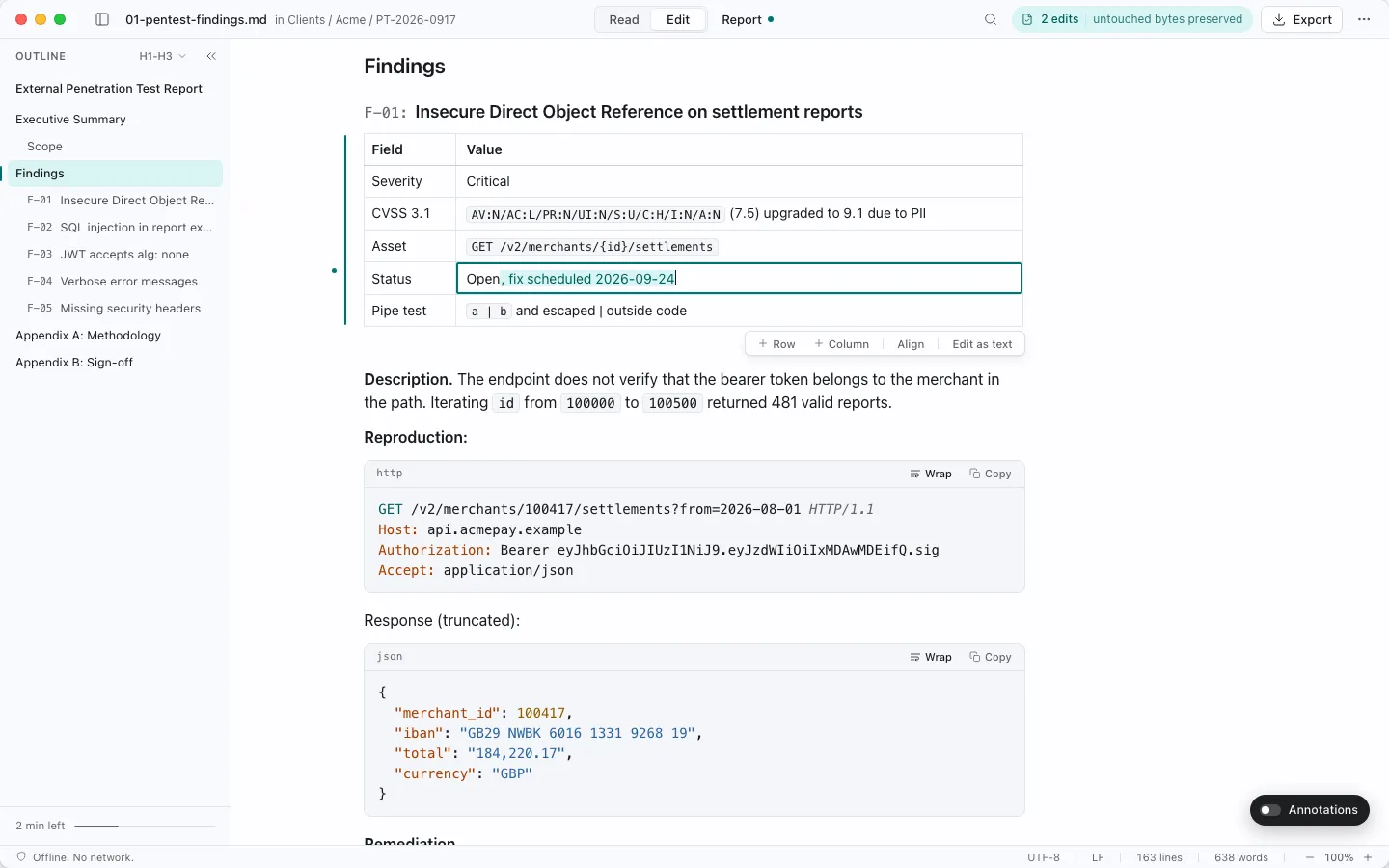
AsItIs editing a findings table cell in place; the status pill reads 2 edits, untouched bytes preserved
Two edits in a findings table. Everything else on disk stays byte-identical.

The 30-second version

Fix two cells. Ship a two-line diff.

A pentest report saved by a Windows tool: CRLF line endings, a byte-order mark, 115 lines. Two edits in the findings table.

Open it. Nothing moves.

02-ai-code-audit.md File unchanged CRLF UTF-8 BOM 115 lines

The file renders in under 300 ms. The status pill says the file on disk is exactly what you opened.

Fix the hostname and the score.

Asset
api.payments.example
CVSS 3.1
9.1
Status
Open

Click into the table, type, save. Pill: Saved, 2 lines changed. New text follows the file's own line endings.

Check the diff.

$ git diff --stat 02-ai-code-audit.md | 4 +- 1 file changed, 2 insertions(+), 2 deletions(-)
AsItIs2 of 115 Plain source save115 of 115 WYSIWYG engines102 to 115

Same two edits, same file, in editors built on the usual engines: every line rewritten, the BOM gone, CRLF turned into LF.
Numbers from the round-trip benchmark, file 02 (CRLF + BOM). "Plain source save" is a source editor that normalises line endings on save; "WYSIWYG engines" is the range across remark, prosemirror-markdown, turndown, Milkdown and Tiptap (88.7% to 100% of lines). Engines were tested directly, not the branded apps.

Proof

We saved six reports with 5 engines. All 5 rewrote them.

Load a file, save it with no edits, count the lines that changed. The serialising engines changed 7 to 100% of lines and returned 0 of 6 files byte-identical. Saving only the edited ranges back into the original bytes (the technique AsItIs uses) changed 0.

Percent of lines changed when each engine loads and saves the file with no edits. Lower is better. 0 is byte-identical.
Reportremarkprosemirror-markdownmarked + turndownMilkdown 7Tiptap 3CodeMirror 6 (naive save)Patch-on-save (reference)
01 Pentest findings (LF)32.5%45.4%44.8%36.2%38.7%00
02 AI code audit (CRLF + BOM)88.7%100%100%88.7%100%100%0
03 SOC 2 readiness (mixed CRLF/LF)64.8%64.8%63.4%64.8%59.2%33.8%0
04 Architecture spec14.3%37.4%38.5%18.7%25.3%00
05 LLM chat export11.2%7.1%16.3%11.2%10.2%00
06 Edge cases (no final newline)36.0%42.1%48.2%38.6%40.4%00
Byte-identical files0/60/60/60/60/64/66/6

Lines changed on a load-and-save with no edits, 6 report files. Engines are the ones behind common WYSIWYG and source editors; the harness is public. Milkdown and Tiptap ran with default presets. The last column is the reference implementation of the technique AsItIs uses.

Method, damage list and how to reproduce it or run it yourself on GitHub

What it looks like

Reads like a report, not a wall of markdown.

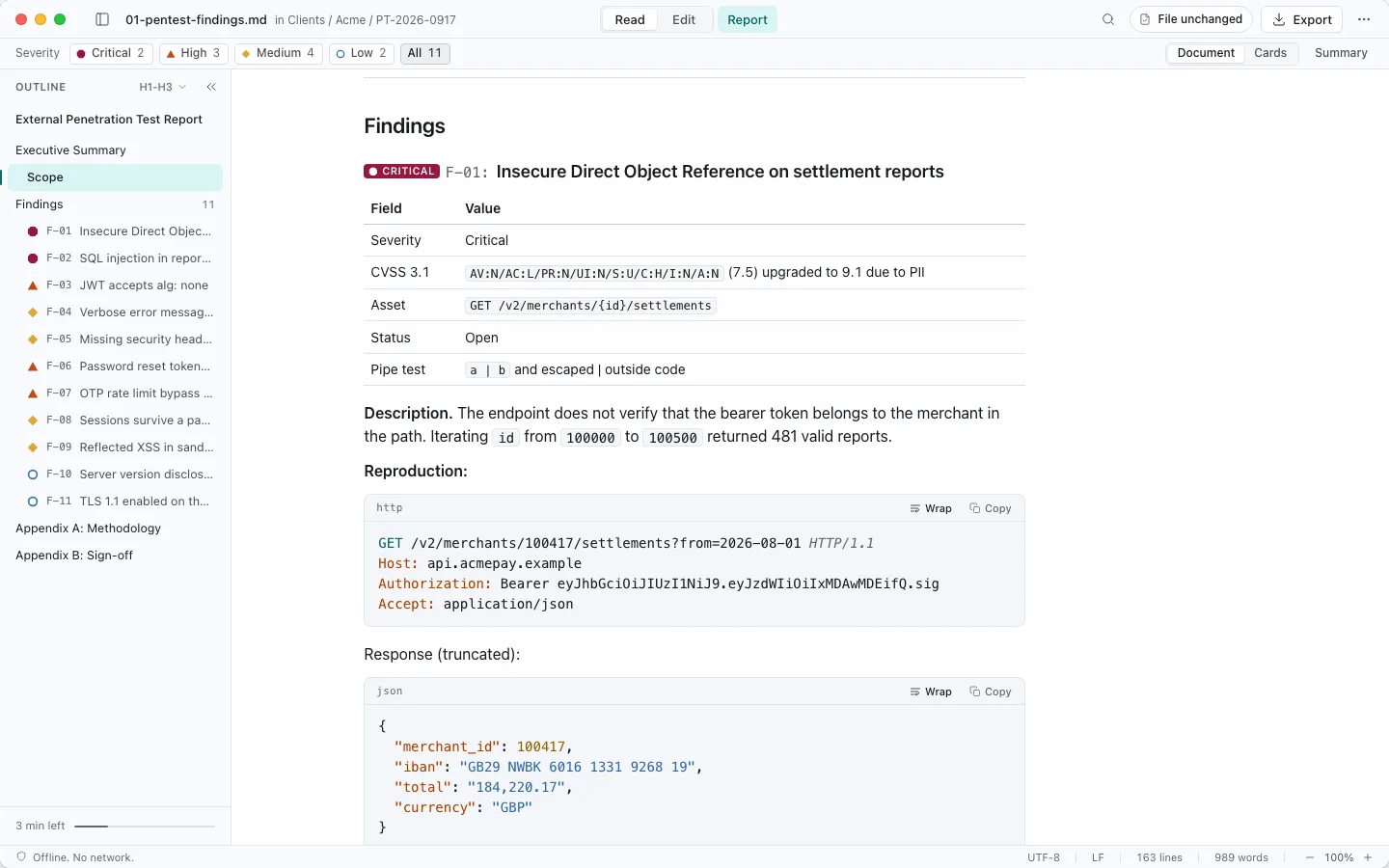
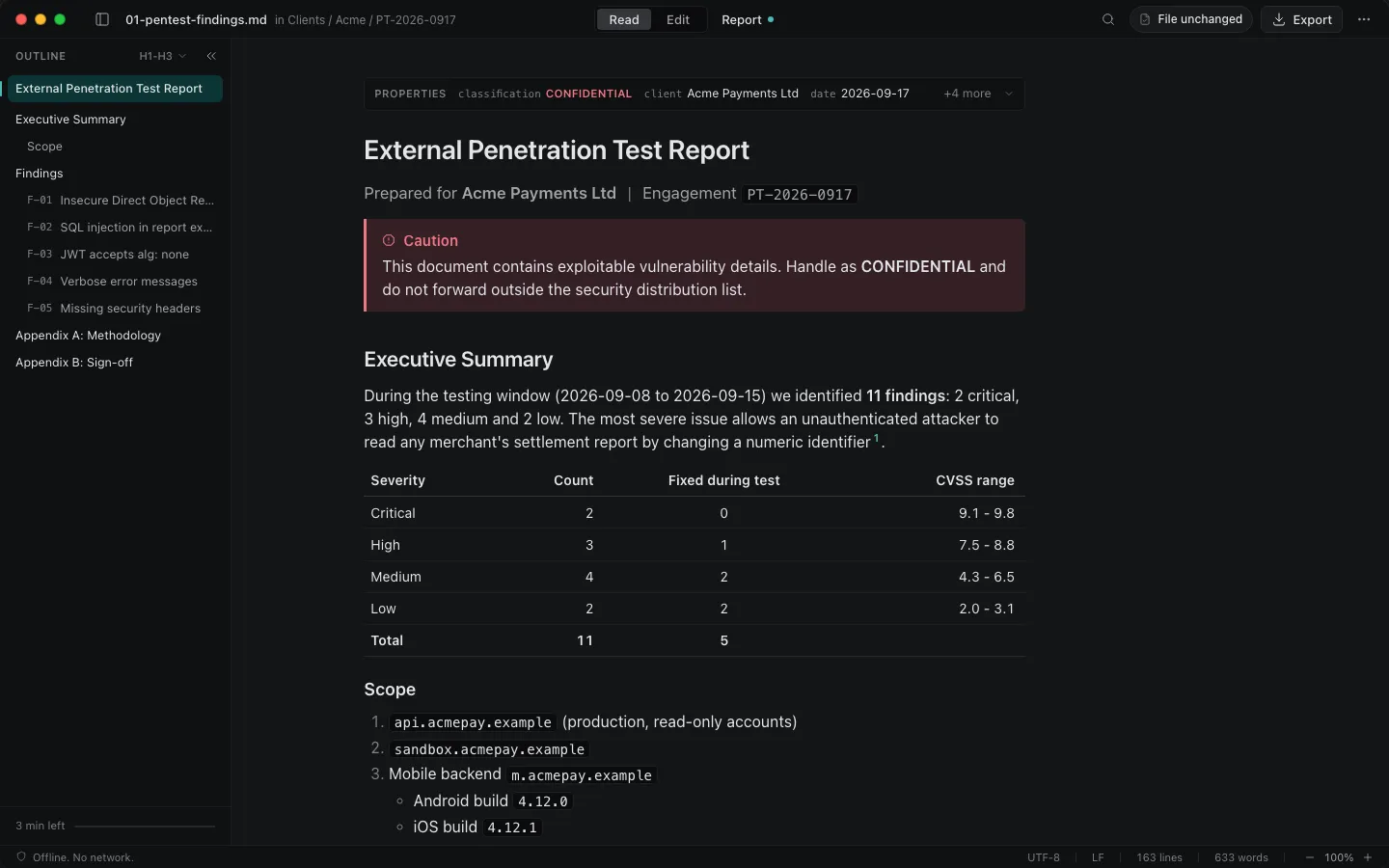
AsItIs Report Mode showing a penetration test findings report with a severity bar, an outline of findings F-01 to F-11 and a critical finding card
Report Mode: severity filters, finding cards, outline with badges. Free.
AsItIs in dark mode showing the same report with the outline sidebar
Dark mode follows the system. Same fonts and colours go into the PDF and Word export.

Two jobs

Built for the last mile of a report, and for the files your agents live in.

Hand off a client-ready report

The findings came out of a scanner, an agent or a colleague as markdown. You fix the wording, retest a finding, add the sign-off row, and export. Cover page, table of contents, page numbers, severity summary, a findings table that survives the page break.

  • Plain PDF with page numbers is free
  • Security findings template and styled Word export in Pro
  • Same fonts and colours on screen, in the PDF and in Word

How the export works

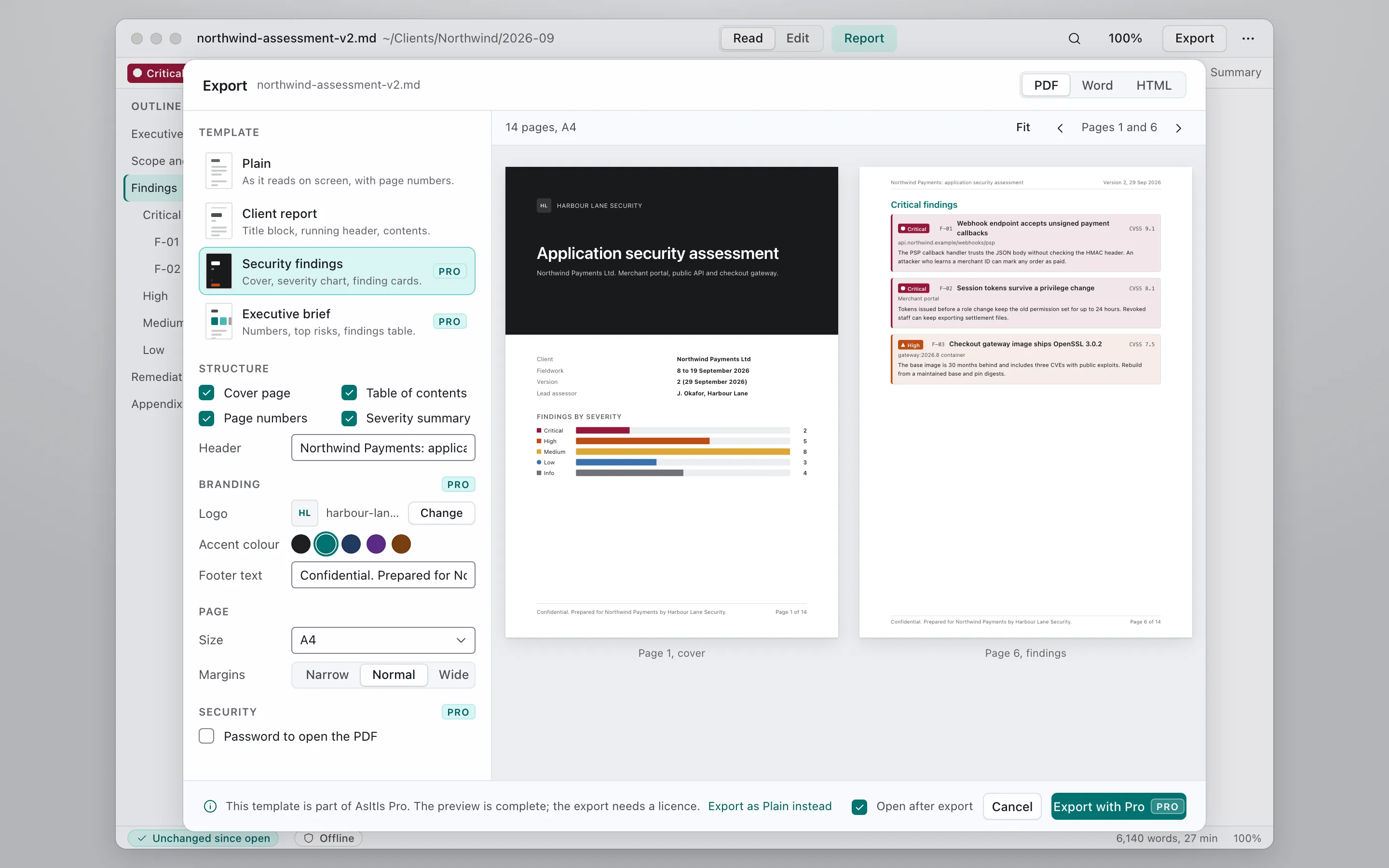
Export dialog with the Security findings template selected and a two-page preview: a dark cover page with a findings-by-severity chart and a page of critical finding cards
Export sheet with a real page preview. Templates that need Pro say so before you click.

Keep agent steering files intact

CLAUDE.md, AGENTS.md, SKILL.md and rule files are read by machines and edited by humans and agents in turns. An editor that reflows lists, escapes brackets or converts line endings makes every commit noisy and some instructions silently wrong.

  • Byte-clean save: the file on disk only differs where you typed
  • Files tab lists steering files with lines and a token estimate
  • Frontmatter validation for SKILL.md, agents and rules
  • Diff since you last looked, when an agent rewrote the file under you

Why editors change CLAUDE.md

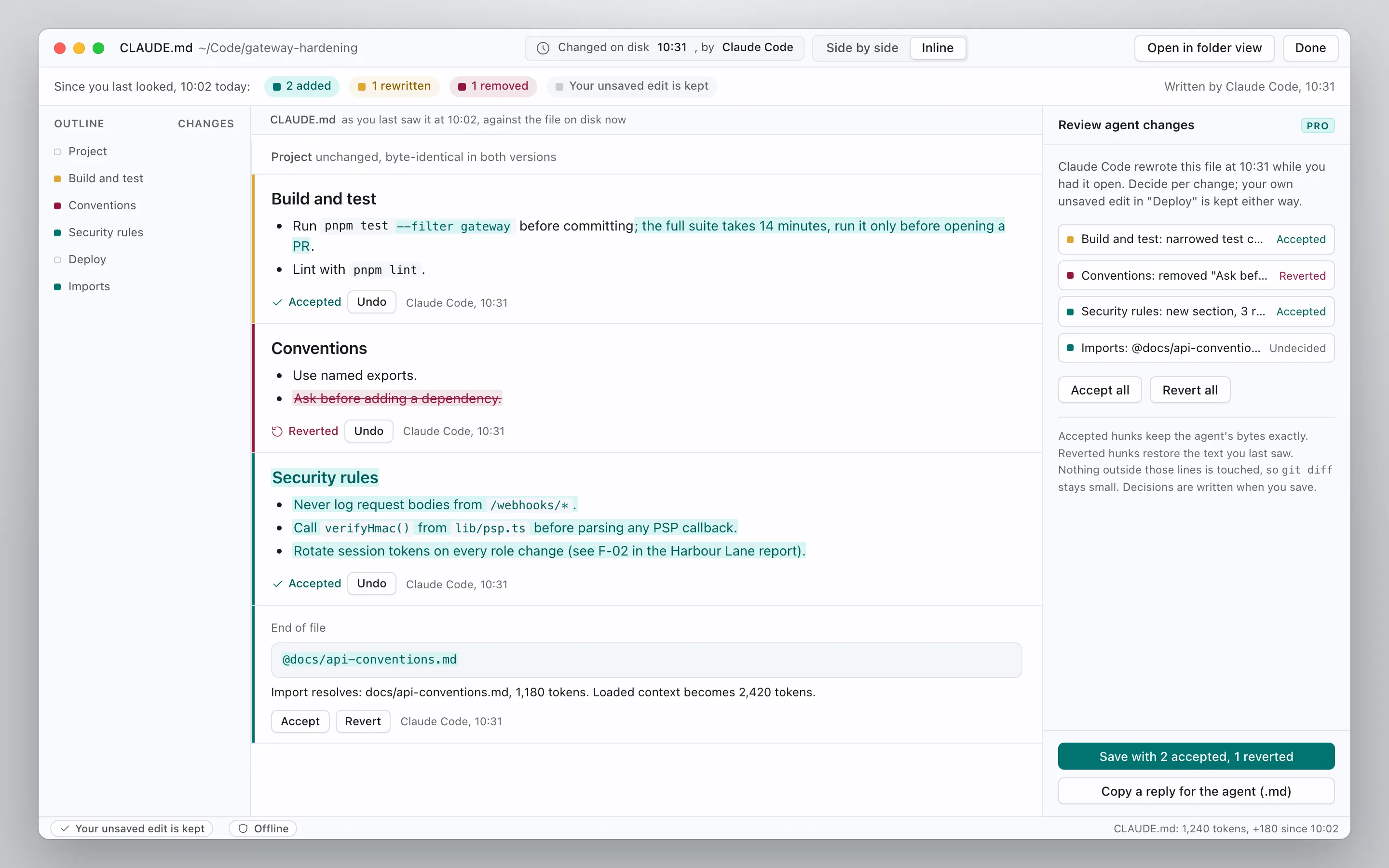
CLAUDE.md changed on disk by Claude Code: the diff view shows two added sections, one rewritten line and one removed line since the user last looked
An agent rewrote CLAUDE.md while it was open. The diff shows exactly what changed. Per-change review shown here comes after the beta; the beta ships whole-file diff with Keep all and Revert all.

For Claude Code

The plugin that checks steering files and guards against rewrites.

Free, open source and read-only. It lints SKILL.md, CLAUDE.md, AGENTS.md and rule files, estimates the context they cost, flags hidden instructions, and adds an optional hook that warns before the agent converts your line endings. No network, no writes.

claude plugin marketplace add Katta041/asitis-agent-tools
claude plugin install asitis@asitis

What it checks, what it never sends or view the source

$ /asitis:md-lint .claude/skills/pdf-export/SKILL.md Linted 1 file(s): 1 error(s), 2 warning(s), 0 note(s). line 2 error name-format: name "PDF Export" must be lowercase letters, digits and single hyphens line 2 warning name-dir-mismatch: name does not match its folder "pdf-export" line 6 warning hidden-instruction: Hidden HTML comment asks to ignore other instructions Edit these files without rewriting them: https://asitis.app/?ref=mcp

Pricing

Free to read and edit. One-time price for the handoff.

Free

$0

Reader, byte-clean editing, Report Mode, Plain PDF, agent-change diff.

Firm

$79 per seat, one time

Minimum 3 seats. Invoice or PO, firm template pack, 24 months of updates.

Full comparison and the founding offer

Trust

We cannot see your reports, because nothing is sent.

No network by default

The app makes no connection until you tick one. The update check is off until you turn it on. CI runs the whole app with the network denied.

Two endpoints, published

Every address the app can ever contact is listed on the Network activity page. Check it with Little Snitch or Windows Firewall.

No account, offline licence

Pro is a signed licence file you keep. It is verified on your machine. SBOM and checksums are published with each release.

Security and privacy in full

Join the waitlist

One email when the paid beta opens, one when 1.0 ships. Founding licences (24 months of updates) go to the list first. No other mail.

Stored by Buttondown. Unsubscribe in one click. See the privacy policy.